How to Feed Social Data Into Snowflake, BigQuery, and Databricks
If you're building analytics on social media or review data, we’re willing to bet you’ve hit a version of this problem: the data lands fine in staging, the pipeline looks clean, but weeks later a column has gone null, a metric is off, or someone in Slack is asking why the numbers don't match.
The root cause is almost always in the gap between how social data actually behaves and how the warehouse expects data to behave.
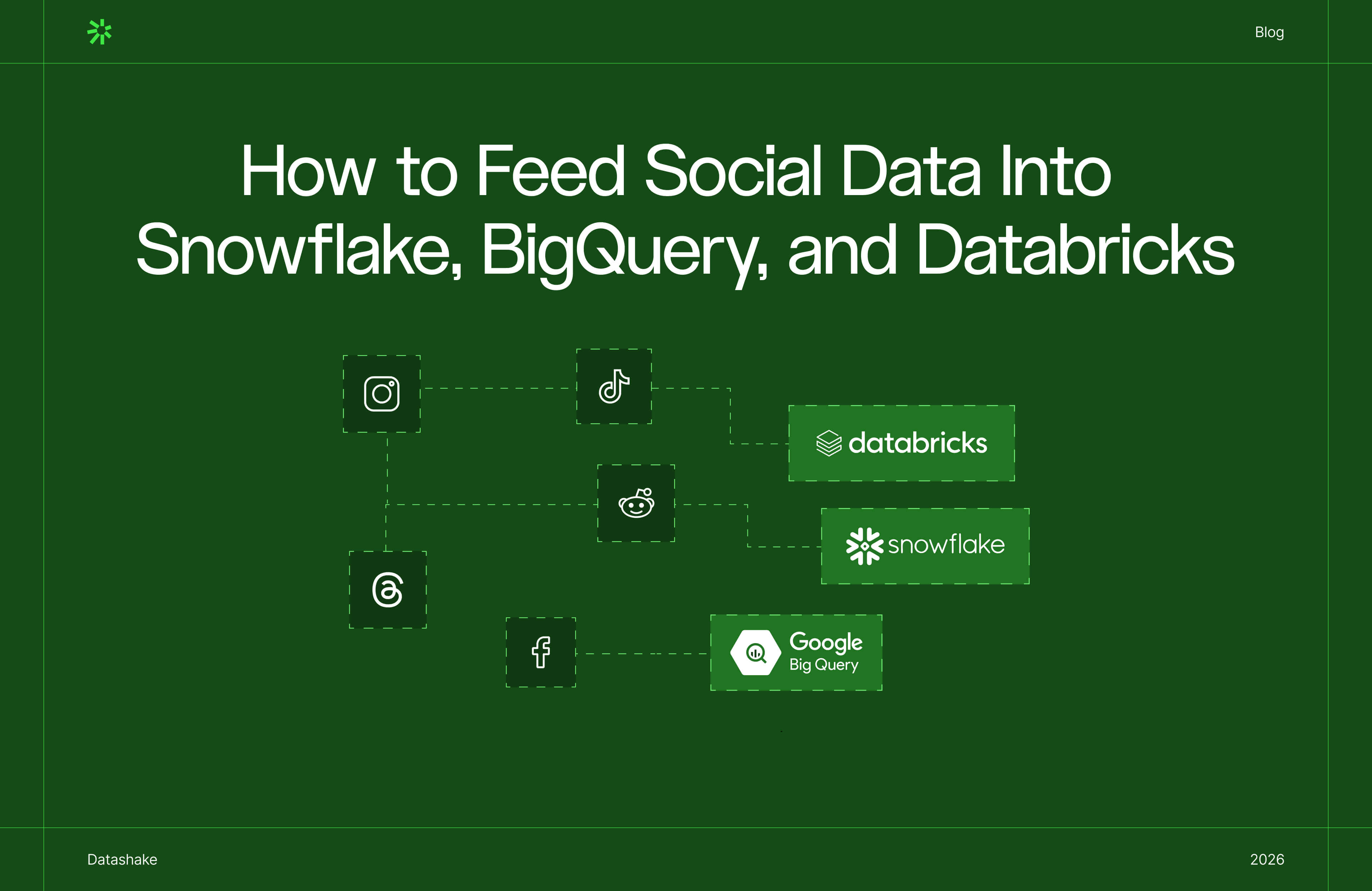
This post is a technical guide to feeding social and review data into the three platforms where enterprise data teams are doing this work: Snowflake, BigQuery, and Databricks.
A practical account of the architecture decisions that determine whether pipelines hold up in production. Let’s dive right in ⬇️
Ingesting social media and review data into Snowflake, BigQuery, or Databricks requires a raw-first storage layer (write API responses as-is before any transformation), explicit deduplication keyed on stable platform post IDs, partitioning by event time rather than ingestion time, and schema-flexible storage – Snowflake's VARIANT column, BigQuery's JSON column type, or Delta Lake on Databricks – to absorb API schema changes without pipeline failures.
What this guide covers
- Why social data creates distinct engineering problems that most warehouse documentation glosses over
- The one architectural decision (raw-first storage) that applies across all three platforms
- Ingestion methods
- Schema design
- AI enrichment options for Snowflake, BigQuery, and Databricks individually
- The ELT tool layer teams need
- And how to choose between platforms for a given workload.
Why social media and review data is harder to ingest than most data sources
The majority of data sources have stable schemas, fixed records, and predictable volumes.
👀 A Salesforce CRM export or a PostgreSQL orders table. Every row has the same columns, a record written at time T doesn't change, and volume grows at roughly the rate your business grows.
Infrastructure wise, you build the pipeline once, it keeps working, and the maintenance burden is low.
Social and review data has none of that. ❌
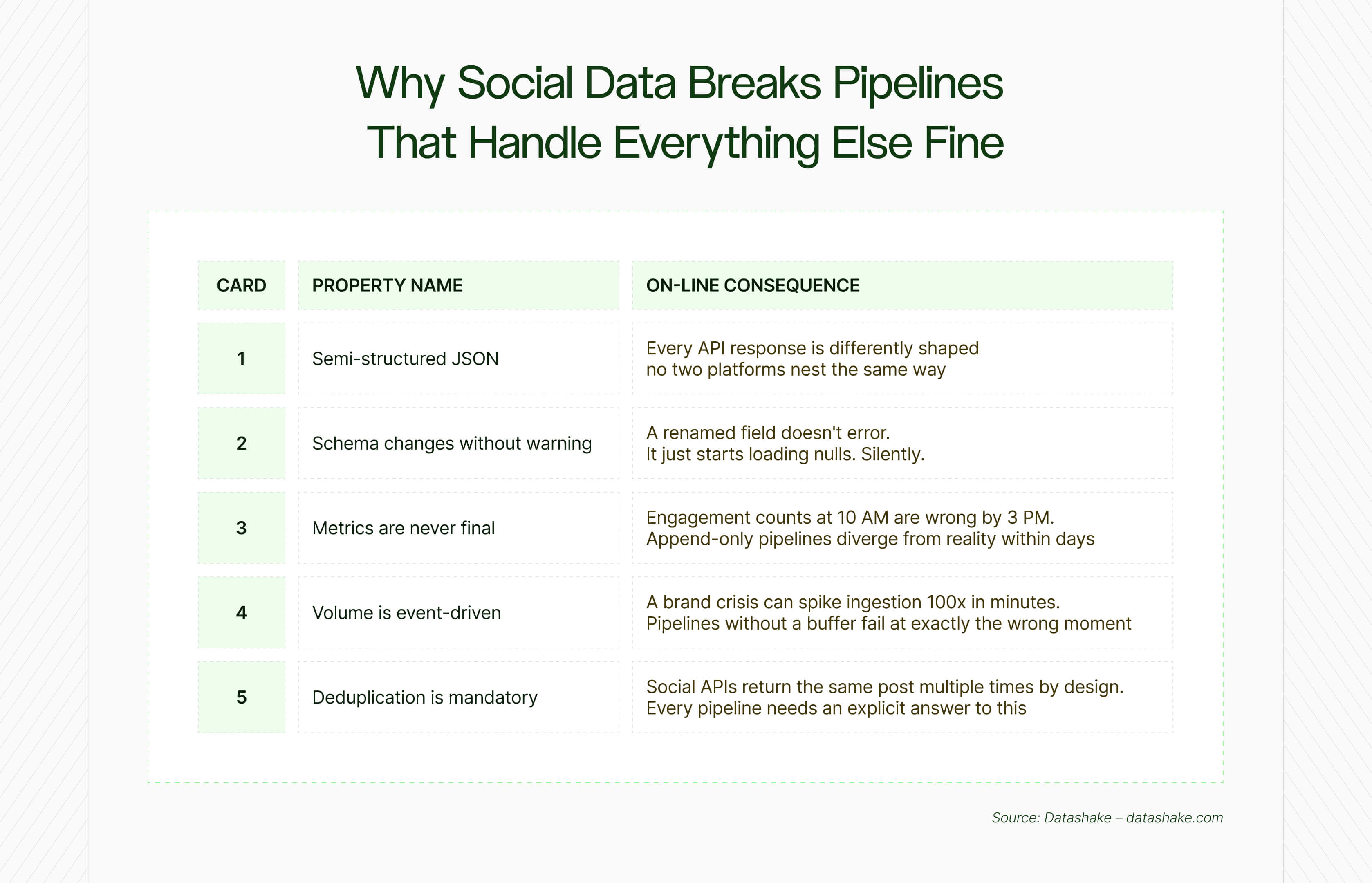
These are the structural properties of the data that every pipeline has to be designed for from the start.
.jpg)
⬇️It arrives as deeply nested JSON, and the nesting is not consistent
A single post object from a social API might contain a user sub-object, an array of hashtags, an array of media objects, engagement metrics, and a layer of platform-specific metadata – all nested and variable.
The nesting isn't decorative; it reflects hierarchical relationships in the data. The problem is that none of it is flat, or typed, and the structure differs not just between platforms but between endpoints on the same platform.
All three warehouses can store this. The engineering question is how much work happens at ingestion time versus query time, and what breaks when the shape of the data changes ❓
The schema changes without notice
Social media platforms update their APIs on their own timelines ⬇️
- A field called author.name in one version becomes author.profile.display_name in the next
- An endpoint gets deprecated
- A nested object gets restructured
The insidious part isn't the change itself, it's that pipelines loading directly into typed columns don't error on these changes. They just start ingesting nulls. The dashboard still refreshes, the pipeline still shows green.
Schema drift is well documented as one of the most common causes of dashboard failures in production, because it doesn't look like a failure until someone checks the numbers.
💡 Teams building these pipelines are operating in a headless model: pulling raw data into their own infrastructure rather than relying on an all-in-one tool. If that concept is new, this primer explains the distinction.
Social metrics are continuously updated
A transaction record is immutable once it's written. Social data isn't.
A post's engagement count at 10 AM is different from its count at 3 PM and different again the following morning. Review ratings get revised. Comment threads grow on old content.
Attribution data updates retroactively as downstream conversions are confirmed. Meta's Ads API, for instance, requires a rolling re-fetch window of at least three days to converge on accurate numbers. A pipeline designed around append-only semantics (ingest once, never revisit) will produce numbers that look plausible but are wrong. ⚠️
Volume is determined by external events, not your pipeline schedule
Social data doesn't produce volumes that are predictable.
A brand crisis, a viral moment, or a product launch can push ingestion volume 10–100x above baseline within minutes.
But a pipeline that writes directly from the API to the warehouse with no buffer in between will either throttle under that load, drop events, or generate warehouse costs that bear no relationship to normal operating spend. The buffer is a message queue or cloud object storage sitting between the API and the warehouse.
Deduplication is mandatory
Social APIs return overlapping data by design.
Paginated endpoints, overlapping time windows, and retry logic all produce the same records more than once. And so does querying the same topic or keyword from multiple angles, where different search inputs can match and return the same post.
This is a property of how these APIs work, and any pipeline that doesn't account for it will accumulate duplicate records silently.
➡️ MERGE statements keyed on a stable platform post ID handle this at load time. Downstream deduplication in the transformation layer handles it after the fact.
💡 The structural challenges above assume you're getting the data in the first place. This post covers why most pipelines are working from an incomplete picture before the ingestion problem even starts.
Setup and ongoing maintenance is hugely costly
Technical complexity is one thing. What companies underestimate is what it actually costs to keep these pipelines effective over time.
The setup cost is hefty: engineering time to build ingestion pipelines, design schemas, write transformation logic, handle deduplication. The ongoing cost is less obvious, and significantly larger than most teams budget for.
- Social platforms change their APIs without notice
- Rate limits shift
- Endpoints get deprecated mid-quarter
- A pipeline that ran reliably in January needs patching in March, and again in June
- Every hour a data engineer spends maintaining ingestion infrastructure is an hour not spent on the analysis that justified building it in the first place
- Research suggests data engineering teams spend 40–60% of their time maintaining fragile pipelines rather than delivering insights – and social data pipelines, with their unstable schemas and evolving APIs, sit at the expensive end of that range.
This is the real tension at the centre of building on social data: the infrastructure overhead is continuous, not a one-time build cost.
One architectural decision that applies to all three platforms: raw-first storage
Raw-first storage is a data pipeline pattern where every API response is written to a storage layer in its original format before any transformation occurs. The raw data is retained indefinitely, enabling reprocessing, schema change recovery, and logic updates without re-calling the source API. It applies equally to Snowflake, BigQuery, and Databricks.
One design decision matters more than any other: always write the raw API response to a storage layer before doing anything else with it.
This is the decision that determines whether a pipeline is repairable when things go wrong. Here's why:
- Schema changes upstream? You can re-derive the flattened, typed tables from raw data without going back to the API
- Downstream transformation logic had a bug? Roll back and reprocess from raw
- A new business question requires a field you didn't originally extract? It's in the raw layer.
The practical implementation of this pattern is to store every API response as-is – in a VARIANT column in Snowflake, a JSON column in BigQuery, or an untyped string/struct in Databricks – and add technical metadata columns (ingestion timestamp, source system, file path) at this stage. But nothing gets transformed here. The transformation layer comes later.
💡 Preserving raw data gives you replay capability when your logic changes. But representativeness (whether your source coverage is actually reflecting the conversations that matter) is a problem that can't be fixed at the pipeline layer. This framework covers how to audit your coverage before you build.
Ingesting social data into Snowflake: what you need to know
Snowflake offers three primary ingestion paths for social data: COPY INTO for bulk file-based batch loads, Snowpipe for near-real-time event-triggered file ingestion with ~1 minute latency, and Snowpipe Streaming for direct row-level SDK inserts with sub-10-second latency. The right choice depends on whether your social data arrives as scheduled file dumps or as a live API stream.
.jpg)
Snowflake ingestion methods for social data
Snowflake offers several ingestion paths, and the right one depends on how your social data arrives.
COPY INTO loads data from files staged in S3, Azure Blob, or GCS. It's the right choice for batch loads (historical backfills, large scheduled exports) but introduces minutes of latency.
Snowpipe triggers automatically when new files arrive in cloud storage, using event notifications. Latency is roughly one minute after a file lands. This will probably be the natural fit if your social data is being dumped to S3 by an upstream process on a schedule.
Snowpipe Streaming is the real-time option – direct row-level inserts via SDK, with sub-second to seconds latency. The high-performance variant reached general availability in September 2025 and supports up to 10 GB/second with sub-10-second latency. For a social data pipeline, this is more throughput than you'll ever need from a single source, but the architectural benefit is direct API-to-Snowflake ingestion without intermediate staging.
For high-throughput streaming, the Kafka Connector + Snowpipe Streaming combination adds Kafka as a buffer (which handles the volume spikes mentioned above) and uses the streaming connector to write from Kafka topics directly to Snowflake with columnarisation of incoming JSON.
💡 If you're still deciding whether to build custom extraction or use a managed connector, this post works through the full cost-benefit analysis, including where the hidden costs of building tend to surface.
How Snowflake handles semi-structured JSON: the VARIANT data type
Snowflake's VARIANT data type is a flexible container that stores any semi-structured data – JSON, AVRO, ORC, Parquet, or XML – without a predefined schema. It uses a compressed, self-describing columnar format that allows querying nested fields via dot-notation without flattening the data first. For social data, VARIANT is the correct storage type for raw API responses in the Bronze layer.
The VARIANT data type is Snowflake's mechanism for handling semi-structured data.
It stores any JSON, AVRO, ORC, Parquet, or XML without a predefined schema, in a compressed, self-describing columnar format. Three native types work together: VARIANT (flexible container), OBJECT (key-value pairs), and ARRAY (ordered lists).
A few details matter for social data:
- Snowflake automatically extracts semi-structured fields into columnar form, but it won't automatically extract fields containing null values or mixed data types – a common occurrence in social APIs. Use the STRIP_NULL_VALUES file format option to strip nulls before load.
- The VARIANT type has a 16 MB per-row size limit – relevant if you're storing large media payloads or long review text alongside metadata. Store media separately.
- When loading JSON arrays, use STRIP_OUTER_ARRAY to remove the outer array structure and load records as individual rows rather than a single large array.
The Bronze → Silver → Gold pipeline in Snowflake
.jpg)
The Bronze → Silver → Gold pipeline in Snowflake is a three-layer data architecture where Bronze stores raw JSON in VARIANT columns (append-only, no transformation), Silver flattens and deduplicates that data into typed columns via SQL or dbt models, and Gold holds aggregated, BI-ready outputs. Snowflake Streams and Tasks provide native orchestration between each layer.
Snowflake Streams and Tasks provide a native orchestration layer for this progression ⬇️
- Bronze table: Raw JSON in a VARIANT column, append-only, with ingestion_timestamp and source_platform added as typed metadata columns. Without transformation of content.
- Silver table: SQL or dbt models flatten the VARIANT JSON via dot-notation (e.g., src:user:followers_count::INTEGER), deduplicate using MERGE on platform + post_id, and apply data quality rules.
- Gold table: Aggregated metrics, sentiment scores, engagement trends – formatted for BI tools and dashboards.
Streams capture which rows in the Bronze table are new since the last task run, enabling efficient incremental processing.
A root Task triggers raw ingestion; a dependent Task fires on completion and runs the transformation. Snowflake Alerts can monitor the pipeline log table and fire notifications if row counts are anomalous or if a run fails to complete within its expected window.
In-warehouse AI enrichment with Snowflake Cortex
Snowflake Cortex is a suite of LLM-powered functions callable in standard SQL, requiring no model deployment or MLOps infrastructure. For social and review data, the key functions are SENTIMENT() (returns a -1 to 1 score), SUMMARIZE() (condenses long text), TRANSLATE() (normalises multilingual content), and EMBED_TEXT_768() (generates vector embeddings for semantic search and clustering).
For teams who want to enrich social and review data at the warehouse layer, Snowflake Cortex provides NLP functions callable in standard SQL:
- SENTIMENT() returns a score between -1 and 1
- SUMMARIZE() condenses long review text
- TRANSLATE() normalises multilingual data
- And EMBED_TEXT_768() generates vector embeddings for semantic similarity and clustering.
- COMPLETE() is available for custom classification and entity extraction tasks.
The value here is operational simplicity: sentiment analysis without model deployment, without a separate ML pipeline, without MLOps overhead.
A single SQL statement like SELECT SNOWFLAKE.CORTEX.SENTIMENT(review_text) AS sentiment_score runs at warehouse scale. Eaton, a power management company, reported a 900% improvement in processing time and $500,000 in annual cost savings after migrating customer sentiment analysis from a custom Databricks build to Snowflake Cortex AISQL.
Distributing social and review data as a product via Snowflake Marketplace
Snowflake's Marketplace and Secure Data Sharing architecture is pretty useful for anyone distributing social or review data as a product.
Zero-copy sharing means consumers query live data directly without ETL or file delivery. Providers publish a listing once; consumers subscribe and get live-updating access.
Ingesting social data into BigQuery: what you need to know
BigQuery offers three primary ingestion paths for social data: Pub/Sub BigQuery subscriptions for zero-code streaming directly from Pub/Sub topics into BigQuery tables, Dataflow (managed Apache Beam) for streaming with pre-load transformations, and the Storage Write API for high-throughput direct inserts. Unlike Snowflake, all paths are fully serverless – no compute cluster to provision or size.
BigQuery ingestion methods for social data
BigQuery's serverless architecture means there's no compute provisioning question. The ingestion design centres on latency requirements and whether transformation is needed before data lands.
Cloud Pub/Sub → BigQuery direct subscription is the zero-code streaming path. A Pub/Sub topic writes directly to a BigQuery table using the Storage Write API – without Dataflow pipeline, code, or infrastructure to manage.
Google announced this in 2022 and it has since become the simplest option for structured JSON payloads that match the target table schema. You pay for Pub/Sub message delivery; there's no additional ingestion cost for the BigQuery subscription itself.
The constraints matter. The direct path only supports at-least-once delivery – if exactly-once deduplication is critical, use Dataflow with the Storage Write API instead. The topic schema must match the BigQuery table schema; messages with improperly formatted fields are not written to BigQuery but blocked in the subscription backlog. Configure the subscription to drop unknown fields, otherwise a schema change will freeze your pipeline.
Dataflow (managed Apache Beam) is the right choice when transformation is needed before data lands: PII masking, field renaming, enrichment with reference data, or complex filtering. Dataflow catches serialisation errors and schema mismatches and writes them to a dead-letter table in BigQuery for inspection.
The Storage Write API is the current recommended approach for streaming inserts; replacing the legacy Streaming Insert API, which charged per row. The Storage Write API charges only for stored data and query processing, not per row inserted.
BigQuery partitioning by event time, not ingestion time
BigQuery's default partitioning is by ingestion time, the time a row is written to the table.
For social data, this creates a trap:
❌ When you re-fetch posts to update engagement metrics, the re-fetched rows land in today's partition, not the original post's partition.
Historical partitions accumulate stale data; today's partition gets rewrite traffic. Queries that filter by date hit the wrong partitions.
➡️ The correct pattern is to include an event_timestamp in each message (the post creation time, not the fetch time) and partition tables on DATE(event_timestamp). This enables partition pruning on historical queries and correct handling of late-arriving data. It's a one-line change in table creation that saves significant cost and complexity later.
How to manage query costs in BigQuery
BigQuery's on-demand pricing charges per terabyte of data scanned, not per row, or per compute hour. This has direct implications for social data workloads:
- Queries that scan wide tables with many columns are expensive. Always SELECT specific_columns, not SELECT *.
- Clustering tables on high-cardinality filter columns (source_platform, author_id) enables block pruning within partitions, reducing scanned data.
- Filter on the partition column in every query – partition elimination is the primary cost control mechanism in BigQuery.
AI and ML enrichment in BigQuery: BigQuery ML, Vertex AI, and Gemini integration
BigQuery ML allows training and running ML models in SQL using CREATE MODEL statements.
For social data, logistic regression classifiers for topic labelling and k-means clustering for audience segmentation are common implementations. BigQuery also supports direct invocation of Vertex AI models (including Gemini) via ML.GENERATE_TEXT() and ML.EMBED_TEXT() from within SQL queries.
Ingesting social data into Databricks: what you need to know
Why Databricks' open lakehouse architecture changes how social data is stored
Databricks is architecturally different from Snowflake and BigQuery in a fundamental way: data lives in customer-owned cloud storage (S3, ADLS, or GCS) in open Parquet files. Delta Lake provides the ACID transactions, schema enforcement, and time travel on top of that storage. Your data is never in a proprietary format you can't read with other tools.
✅ That means you can query a Delta table simultaneously from Databricks SQL, from notebooks, and from Spark jobs. You can time-travel to any historical version. And if your infrastructure strategy changes, your data is already in S3 in Parquet, no migration required.
Databricks Auto Loader
Auto Loader (the cloudFiles source) is Databricks' recommended starting point for file-based ingestion.
Given a cloud storage directory, it detects new files as they arrive, processes them incrementally, and maintains state in a RocksDB checkpoint. When a run fails, it resumes exactly where it left off: exactly-once guarantees without manual state management.
For social data arriving as JSON files in S3 or ADLS, this handles the standard use case cleanly. Auto Loader supports schema inference on first run and can be configured to automatically merge new fields into the Delta table as the source schema evolves. The schema evolution handling that causes null ingestion in more rigid pipelines.
For batch workflows, triggerOnce mode processes all pending files and exits, which enables scheduled processing without a persistent streaming cluster.
Databricks Structured Streaming for complex transforms
Where Snowpipe Streaming handles fast ingest and Pub/Sub direct path handles structured schema matching, Databricks Structured Streaming handles complex real-time transformations:
- Windowed aggregations: Aggregate social posts by 5-minute windows by author and topic before writing to the Delta table.
- Stream-static joins: Enrich incoming posts by joining against a reference dimension table in real-time.
- Watermarks: Define how long to wait for late-arriving events before closing a time window. It’s the mechanism that prevents indefinite memory accumulation when events arrive out of order.
- Exactly-once semantics: Replayable sources (Kafka, Delta) combined with idempotent Delta Lake sinks guarantee exactly-once processing end-to-end.
Structured Streaming is the architecture for social data where the transformation is non-trivial (entity extraction, real-time sentiment scoring, audience classification before persistence).
The Bronze → Silver → Gold medallion architecture applied to social data pipelines
Databricks popularised the Bronze/Silver/Gold pattern, and it maps directly to social data pipelines:
Bronze
Bronze is the raw landing layer. Every API response lands here exactly as received, with ingestion_timestamp, source_platform, and input_file_name added as metadata columns. No schema enforcement on content.
Databricks' own documentation is explicit here: don't write directly from ingestion to Silver. Writing raw API responses to Silver introduces failures on schema changes or corrupt records that you can't recover from without the Bronze layer as a buffer.
Silver
Silver is where deduplication, normalisation, and data quality happen. MERGE operations on platform + post_id handle deduplication. Typed columns are applied to standard fields. Data quality expectations can be defined in Delta Live Tables, which surfaces failures without stopping the pipeline.
Gold
Gold holds aggregated, analytics-ready data: star schema models, pre-computed engagement metrics, feature tables for ML. Z-ORDER clustering on high-cardinality filter columns reduces scan costs.
Handling upserts and deduplication in Databricks: AutoCDC and Delta Live Tables
Social data requires handling both new records and updates to existing records: a post's engagement metrics change; a review gets a response.
Databricks' AutoCDC in Delta Live Tables handles UPSERT semantics declaratively, replacing the custom MERGE logic that social data pipelines traditionally require.
ML enrichment in Databricks: MLflow, Feature Store, and Mosaic AI for social data
Databricks has the most mature ML infrastructure of the three platforms for teams building custom models on social data.
MLflow provides experiment tracking, model registry, and deployment within the same platform
The Feature Store centralises reusable feature definitions – a feature like author_30d_avg_engagement or post_sentiment_score is defined once and consumed by multiple models
Mosaic AI enables RAG (retrieval-augmented generation) over social data: embed review text, store in vector search index, query by similarity.
Databricks remains the most capable and flexible option for teams running complex ML workflows. But for those wanting out-of-the-box NLP in SQL without model deployment, Snowflake Cortex is operationally simpler.
ELT tools for social data pipelines: Fivetran, Airbyte, and dbt
For most data teams, building custom API extraction pipelines from scratch is the wrong starting point. The engineering overhead is significant: handling authentication, rate limits, pagination, schema changes, and retry logic for each source independently.
Fivetran and Airbyte handle the extraction and loading layer with pre-built connectors. Fivetran maintains 500+ connectors and manages API changes automatically – when a social platform updates its API, Fivetran updates the connector.
Data engineering teams often spend 40-60% of their time maintaining fragile pipelines rather than delivering insights; managed connectors eliminate much of that maintenance burden. Airbyte's open-source model provides more flexibility for custom or unusual sources.
💬 Note: Fivetran and dbt Labs announced a merger in October 2025, pending regulatory approval. The intent is to combine managed ingestion with the transformation framework most teams already use for their Silver and Gold layer logic.
dbt is the standard tool for warehouse-native transformation. It runs SQL transformations inside the warehouse after data is loaded, which is where the Silver and Gold layer logic lives in practice. It integrates with all three platforms and works natively alongside Fivetran and Airbyte.
Which platform for which workload?
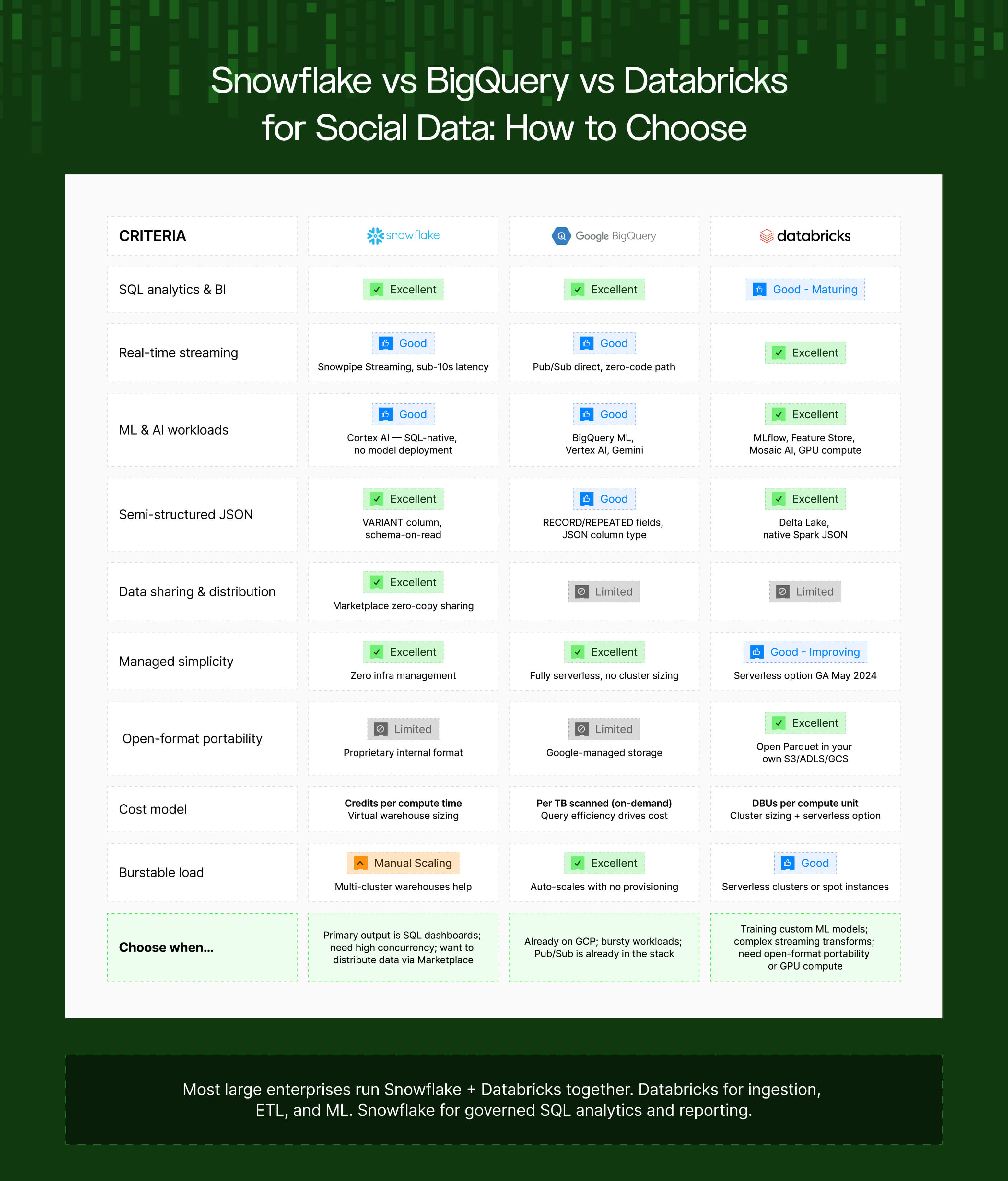
Choose Snowflake when the primary output is SQL analytics and BI dashboards, when you need high concurrency with minimal operational overhead, or when you want to distribute data to other Snowflake accounts via Marketplace.
Choose BigQuery when you're already on GCP and want genuinely serverless analytics, when workloads are bursty and unpredictable (BigQuery auto-scales with no warehouse sizing), or when Pub/Sub is already part of your infrastructure.
Choose Databricks when ML and AI workloads are first-class — training models, not just calling pre-built functions — or when you need complex streaming transformations, open-format portability, or GPU compute for large-scale NLP.
The most common enterprise architecture: Databricks for raw ingestion, heavy ETL, and ML feature engineering; Snowflake for governed SQL analytics and reporting. Confluent (managed Kafka) in the middle as the event bus, routing social data to both.
What this means for how you design your data source
If you're building or evaluating social and review data pipelines, the architecture above has direct implications for how the upstream data source should behave:
Schema stability matters more than schema richness
A data source that delivers a consistent, versioned JSON schema (with advance notice before breaking changes) creates substantially less maintenance overhead than one that changes response structures without notice. Data engineering teams pay a significant premium for sources that don't require patching on short notice.
Primary key consistency determines deduplication reliability
A stable post_id or review_id that remains consistent across re-fetches of the same record is the prerequisite for correct MERGE-based deduplication. Sources that generate new IDs on every response, or that change ID formats across API versions, break deduplication logic downstream.
Null handling and field consistency at the source reduce failures downstream
The most common failure mode in social data pipelines is a field that's present in some responses and absent in others. Predictable null handling – explicit null vs. missing field vs. empty string, handled consistently – reduces the transformation complexity required at the Bronze → Silver boundary.
The pipeline problems documented here aren't inevitable properties of working with social data. They're consequences of the mismatch between how social data sources behave and how production data engineering expects sources to behave. Closing that gap at the source layer is where the most leverage is. 👏
💡 If you want to see what becomes analytically possible once this infrastructure is in place, this post covers the most impactful social data use cases we're seeing across enterprise teams in 2026.
Looking to feed social and review data into your warehouse at scale? Datashake provides normalised, structured social and review data via API, designed for data engineering teams building production pipelines.




More insights you might like